2022-2025 / SaaS / Health / Web - Tablet

Improving the inbox for staff who run more than one practice

1 in 3

messages automatically routed

~5 Min

New rule setup

My Role

My Role

Senior Product Designer — Practice Workflows:

Senior Product Designer — Practice Workflows:

Led discovery with practice admins, ran three rounds of routing concepts through a pilot, and owned UX direction for the automation builder. Worked closely with Product, Engineering, and Customer Success throughout.

Key stakeholders worked with

  • Director of Product

  • Product Manager & Engineering Manager

  • Head of Sales

  • Head of Customer Success

  • Key partners' Practice Admins & CTOs

The challenge

Klara is a communication platform for healthcare practices. At its centre is a shared inbox, where every patient message lands and front-desk staff work through it together.

Some staff look after one practice. Others cover ten or more. As the platform grew, message volume outpaced what the inbox was built for, and staff covering several locations carried most of the load.

The task was to make the inbox hold up at scale for multi-practice staff, without slowing down anyone still running just one. Before designing anything, we needed to understand where their time was going.

Key requirements:
Key requirements:
  • Every message gets read by someone.

  • Practice admins own the setup and the outcome.

  • Self-serve, with little or no onboarding.

Constraints:
Constraints:
  • Two designers, 50+ engineers, six teams. Each of us worked with two teams day-to-day and supported the backend-heavy teams as needed.

  • Customers weren't used to setting up Klara features themselves.

  • Customer access was limited by sales and CS, time zones, and how busy practices were.

Discovery & ideation

Workshops

Sales, support and product each shared what they were seeing. We grouped and voted on it, and the strongest themes all pointed to time lost sorting messages (Fig. 1).

One day of a three-day workshop with sales, support and product. Each team shared what they were seeing from their side. We grouped the observations, voted, and took the strongest ones into the data. I ran a separate session with Design and Product to match our roadmap to the new priorities that came out of our sessions (Fig. 1).

Ideation

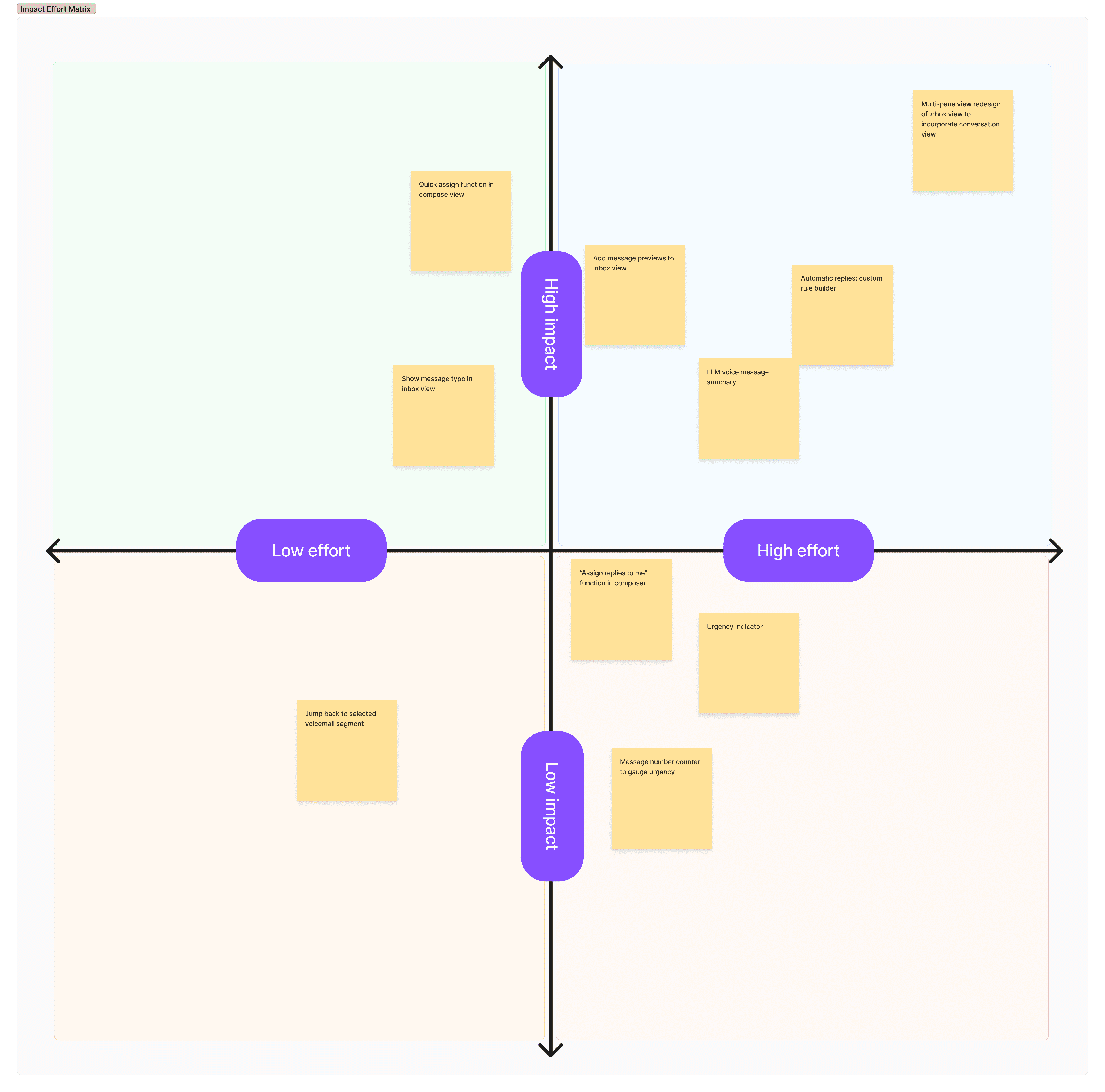
We took that into a How Might We session with product, engineering and data. The strongest ideas moved messages without staff touching them (Fig. 3).

Repeat logins and repeat triage steps rose with every extra location someone covered. Message volume alone didn't explain it (Fig. 2).

Usage data (Looker)

We tested those themes against the numbers. Repeat logins and triage steps rose with every extra location someone covered. Volume alone didn't explain it (Fig. 2). The cost was in the repetition, not the workload.

Repeat logins and repeat triage steps rose with every extra location someone covered. Message volume alone didn't explain it (Fig. 2).

Practice Personas

Farnley Medical Group kept us honest about who this was for: groups with 10+ sites, where one admin needed control over all of them (Fig. 4).

Workshops

Sales, support and product each shared what they were seeing. We grouped and voted on it, and the strongest themes all pointed to time lost sorting messages (Fig. 1).

Usage data (Looker)

We tested those themes against the numbers. Repeat logins and triage steps rose with every extra location someone covered. Volume alone didn't explain it (Fig. 2). The cost was in the repetition, not the workload.

Ideation

We took that into a How Might We session with product, engineering and data. The strongest ideas moved messages without staff touching them (Fig. 3).

Practice Personas

Farnley Medical Group kept us honest about who this was for: groups with 10+ sites, where one admin needed control over all of them (Fig. 4).

Fig. 1 Business priority areas with roadmap items mapped
Fig. 2 Message traffic sources analysed to help us weigh up actions and flows that had the greatest impact on traffic and user experience
Fig. 3 Ideation FigJam snapshot from session with product, engineers, & data
Fig. 4 Practice Persona example made using the research we had undertaken and built to help us better understand the target customer and the needs any solution had to meet

What did this tell us?

What did this tell us?

Staff repeated the same triage at each location they covered. Triage happens before anyone can act, so every message paid that cost first. And because the cost grew with each site, the fix had to work across sites too.

That pointed us to routing, set once by an admin and applied everywhere.

Staff repeated the same triage at each location they covered. Triage happens before anyone can act, so every message paid that cost first. And because the cost grew with each site, the fix had to work across sites too.

That pointed us to routing, set once by an admin and applied everywhere.

Automation rule builder

Automation rule builder

Road to our solution

We got to the builder in stages. Each version went into the pilot and shaped the next one.

    1. Filters per inbox

    Version one was a filter bar in each staff member's inbox. No admin view. Admins logged in as each person and set their location and provider filters by hand. Setup was slow. Staff could change their own filters without anyone knowing. Messages slipped through and landed in no one's view. In a patient inbox, that's a safety risk. We pulled it from the pilot fast.

    1. Mapping message type

    Version two moved routing into an admin-only settings page. Admins picked a message type and sent it all to one inbox. A check warned them if that inbox had no subscribers. It proved two things: practices wanted routing by message type, and we could build it. But each location needed its own setup. A group admin with 10+ sites couldn't manage it from one place.

    1. Early rule builder

    Version three became the central tool: one place for a group admin to set rules across every location. Nothing actually moved. Rules showed or hid messages in each inbox. We looked at Intercom and Salesforce automations. Both were too complex for practice admins. So I borrowed the step-by-step setup of a consumer app's onboarding: pick a type, pick an action, pick the locations.

Solution

Solution

Message Automations Builder

Message Automations Builder

Hypothesis
Hypothesis

If routine messages were routed automatically, staff would only need to step in where "routine" broke down. That would cut the repeated sorting for multi-location teams without putting judgement calls in the wrong hands.

What we built

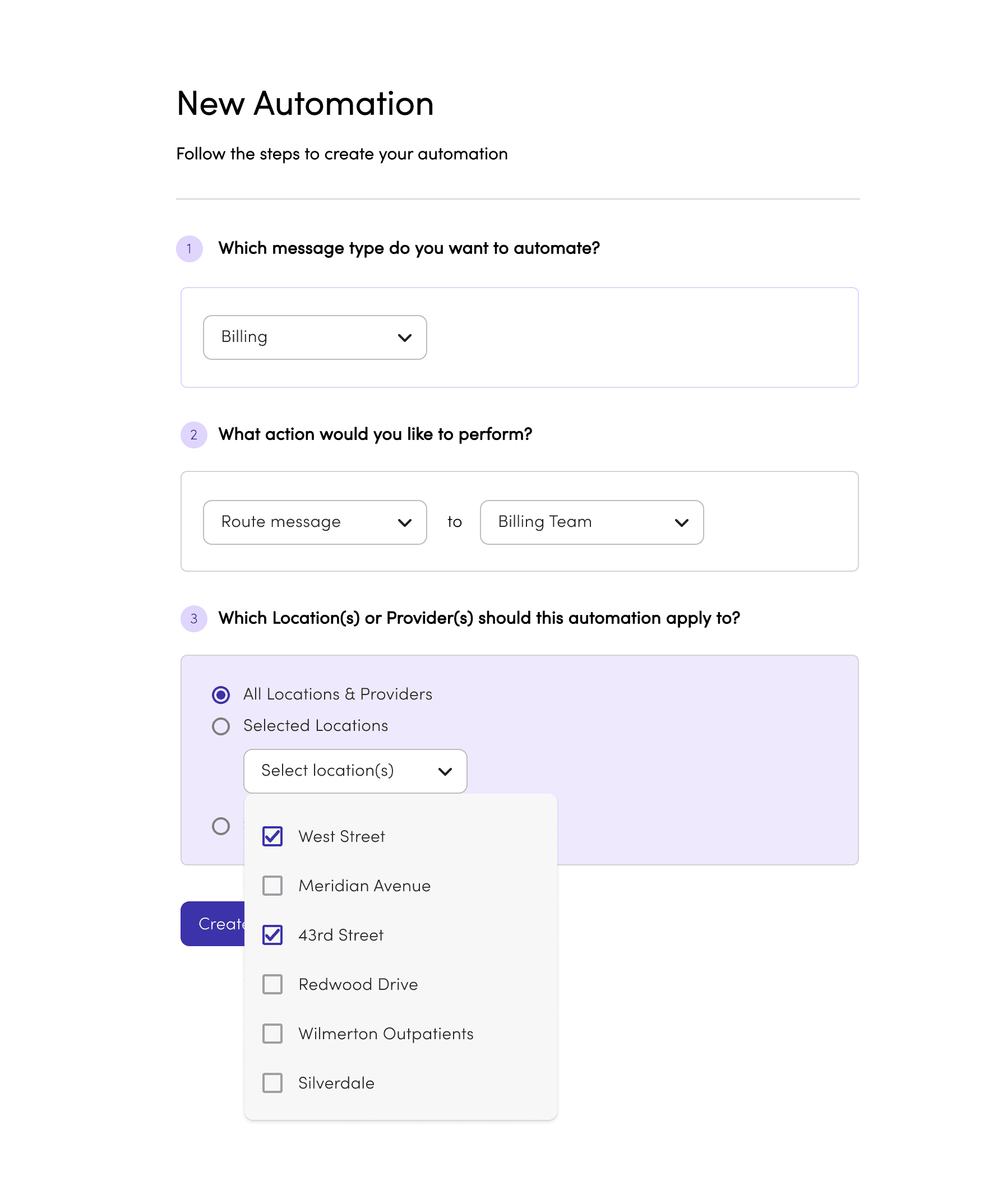
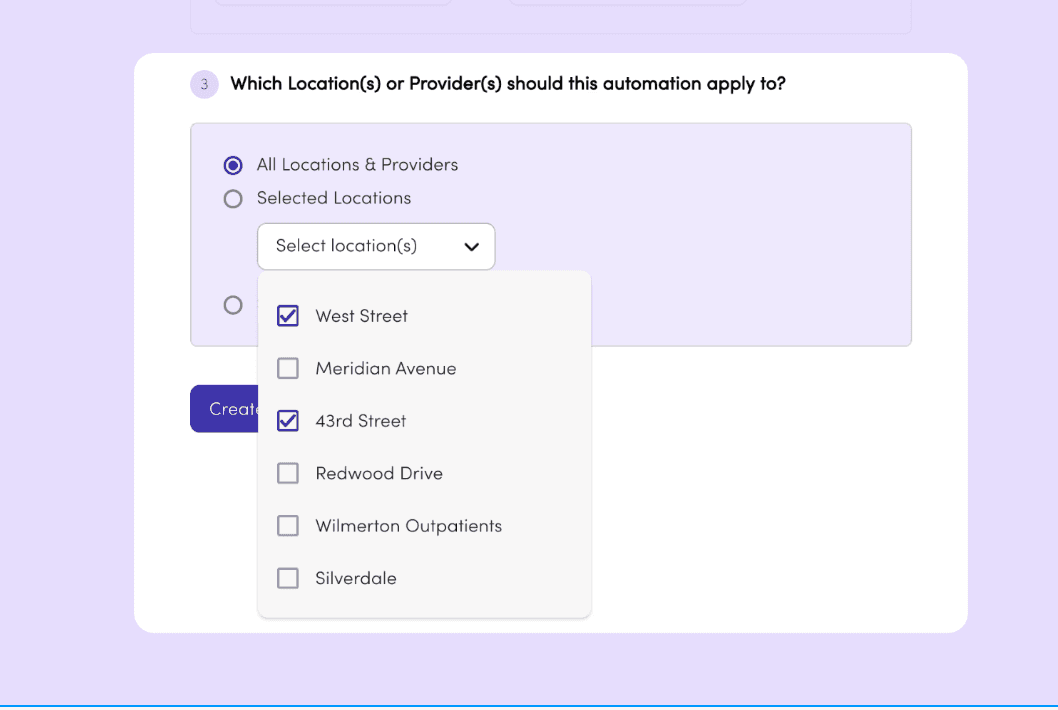
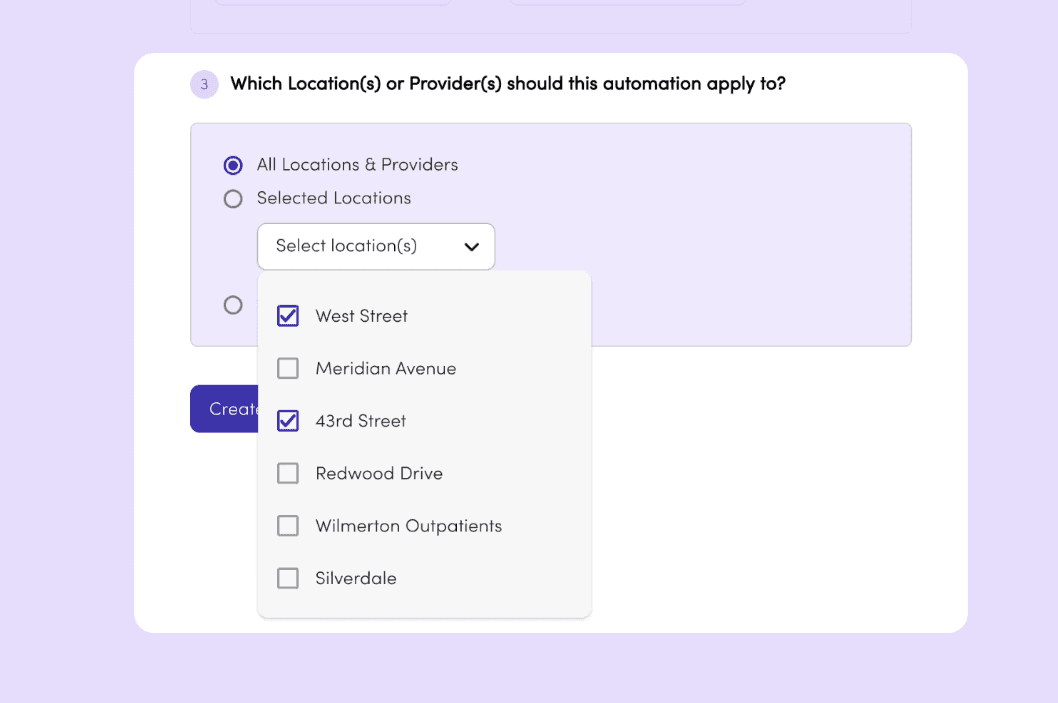
A three-step builder let staff configure routing without engineering support: choose a message type (prescriptions, rescheduling, routine inquiries), pick what happens to it, and set which practices or locations the rule applies to. Configuration took a few minutes, not a ticket.

What we built

A three-step builder let staff configure routing without engineering support: choose a message type (prescriptions, rescheduling, routine inquiries), pick what happens to it, and set which practices or locations the rule applies to. Configuration took a few minutes, not a ticket.

How it works

A three-step builder let staff set up routing without engineering support: choose a message type (prescriptions, rescheduling, routine enquiries), pick what happens to it, and set which practices or locations the rule applies to. Most admins set up their first rule in about five minutes.

Automations hub
Automations hub
Automations hub

STEP

1

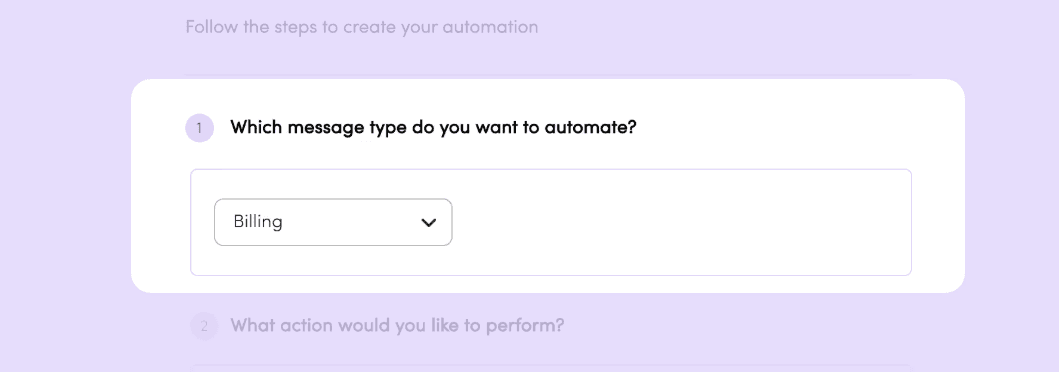
Messages are tagged when a patient starts a conversation. The tag persists for that session, but staff can reassign it if needed.
STEP

2

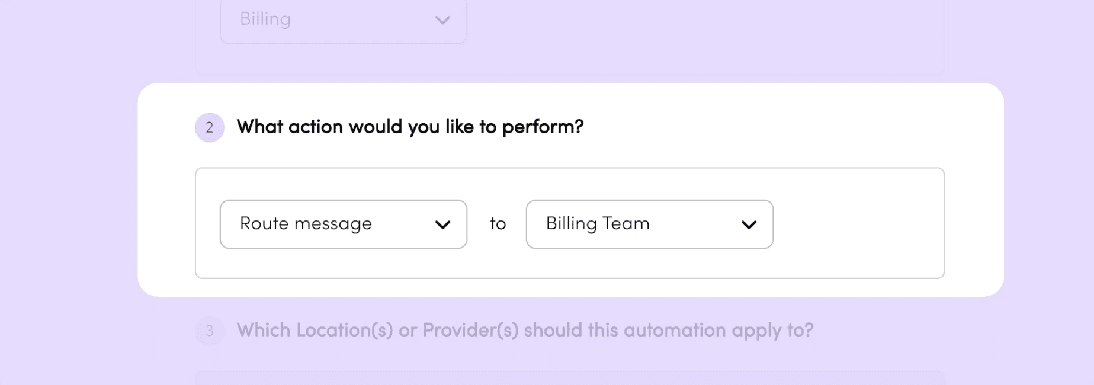
Each rule triggers one of two actions: route the message to the right inbox, or send an auto-reply. Simple by design — the fewer the choices, the faster the setup.
STEP

3

For multi-site practices, rules can apply across all locations or selected ones — so any efficiency saving scales without repeating the setup office by office.
Once the rule is created the staff members are taken to the Message Automation view showing an overview of the active rules categorised by message subject with a simple chip based, sentence structure.

Existing automations are edited or deleted by clicking the row and opening the completed rule.

Discarded ideas

Many iterations of our UI were tried but for reasons of feasibility or fit were discarded or put into an idea backlog

An early version of the builder split the steps across multiple screens to provide simple, concise stages for users. But after some user testing, we found that what we gained in focus per step, we lost by not giving a single overview of the selections being made, which necessitated an overview page so users could check their configuration.

I also experimented with sentence-based naming for rules and using colour-coded pills as ways to make the titles instantly intuitive and scannable. But both added visual clutter when automation rules built up, so we opted for simple brand blue pills.

Outcomes

Admin staff had an overview of the message routing settings applied to their practice

Automated responses and message routing were not adopted, as they were ultimately pulled before the GA release

Additional new logic in the settings area guaranteed that at least one member of each team was assigned to each inbox, eliminating the case of messages landing in unwatched inboxes

Self-service feature that required little hand-holding from Klara CS staff

Admin staff had an overview of the message routing settings applied to their practice

Additional new logic in the settings area guaranteed that at least one member of each team was assigned to each inbox, eliminating the case of messages landing in unwatched inboxes

Self-service feature that required little hand-holding from Klara CS staff

Automated responses and message routing were not adopted, as they were ultimately pulled before the GA release

1 in 3 Auto-Routed: Message routing scaled from 1 in 7 during pilot up to 1 in 3 incoming messages, proving high-scale efficiency.

64% Clinical Adoption: Active staff adoption rate driving automated message routing across daily clinical workflows.

~5 Min Setup: Teams built their first automation rule instantly with zero engineering help required, driving immediate self-serve value.

1 in 3 Auto-Routed: Message routing scaled from 1 in 7 during pilot up to 1 in 3 incoming messages, proving high-scale efficiency.

~5 Min Setup: Teams built their first automation rule instantly with zero engineering help required, driving immediate self-serve value.

64% Clinical Adoption: Active staff adoption rate driving automated message routing across daily clinical workflows.

Learning

We spent too long debating the logic between versions before we had evidence to settle it. Getting a simple MLP into the pilot broke the deadlock.

Next time I'd ship smaller and sooner, and accept some throwaway work along the way.

✧